
找到
7
篇与
易支付
相关的结果
- 第 2 页
-
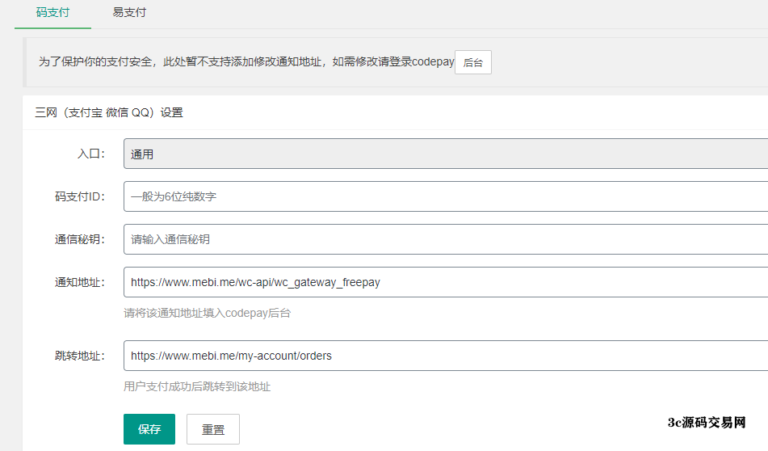
 woocommerce主题对接易支付插件 写这个插件是五年前的事了,最近陆陆续续有人通过各种渠道联系我询问使用方法,让我觉得更新一下插件也是值得的事情。更新后的插件更名为 freepay-woocommerce,意为Woocommerce下的免签约支付,本次更新除了增加功能、修复bug、精简代码外,还支持了目前市面上流行的易支付,本页文档我也就重写了。 1729060247-e04efd90cb41f31-768x451.png图片 更新 支持码支付和易支付两种免签约方式。 默认开 启码支付的支付宝、微信、QQ钱包支付,易支付默认关闭,可以后台手动开启。 一个插件就能开启所有的支付方式,也可以自行选择开启/关闭任意一种支付方式,更灵活。例如你可以选择开启/关闭码支付的支付宝和微信 + 易支付的QQ钱包。 管理员的订单详情页内自动添加备注,用户何时准备支付、以何种方式支付、何时支付等一目了然。针对码支付,还能知道用户是否足额支付,多支付或者少支付多少金额。 判断订单状态,避免重复业务。 其他。。。 使用方法 使用方法跟码支付相似,使用可以参考码支付。这里说重要的东西:网关地址。市面上有很多易支付平台,只是改了一个主页取了个名字,插件提供通用的易支付对接接口,只要填写平台的网关地址即可对接成功。举个例子:如果本站做了易支付,网关域名为pay.mebi.me,那么网关地址为:https://pay.mebi.me/,不要忘了结尾的“/”。 代码片段: <?php class WC_Gateway_Easypay_zfb extends WC_Payment_Gateway { public function __construct() { // 必要的字段 $this->id = 'easypay_zfb'; $this->icon = WC_Freepay_URL.'/assets/logo/zfb-logo.jpg'; $this->has_fields = false; $this->method_title = '易支付——支付宝'; $this->method_description = '易支付——支付宝网关设置'; // 必须调用的方法 $this->init_form_fields(); $this->init_settings(); // 设置request或者response对象会用到的变量 $this->title = $this->get_option('title'); $this->description = $this->get_option('description'); // 保存后台设置的数据 add_action( 'woocommerce_update_options_payment_gateways_' . $this->id, array( $this, 'process_admin_options' ) ); // 实例化异步通知的处理 new WC_Gateway_Easypay_Notify($this); } //配置列表项 public function init_form_fields() { $this->form_fields = array( 'enabled' => array( 'title' => "启用/禁用", 'type' => 'checkbox', 'label' => "是否启用支付宝网关,默认为禁用。", 'default' => 'no', ), 'title' => array( 'title' => "标题", 'type' => 'text', 'description' => '在结算时看到的当前支付方式的名称', 'default' => '支付宝支付', 'desc_tip' => true, ), 'description' => array( 'title' => '描述', 'type' => 'text', 'desc_tip' => true, 'description' => '结算时当前支付方式的描述', 'default' => '本次交易将使用支付宝付款', ) ); } //核心订单处理 public function process_payment($order_id) { global $woocommerce; $order = wc_get_order($order_id); $price = $order -> order_total; $order_items = $order->get_items(); $product_num = count($order_items); foreach ($order_items as $item_id => $item_data) { $product = $item_data->get_product(); $product_name = $product->get_name(); break; } if ($product_num > 1) { $product_name .= "等".$product_num."件商品"; } $type = "alipay"; require("inc/easypay.config.php"); require_once("lib/epay_submit.class.php"); $parameter = array( "pid" => trim($alipay_config['partner']), "type" => $type, "notify_url" => plugin_dir_url( __FILE__ )."inc/easypay_return.php", "return_url" => home_url()."/wc-api/wc_gateway_easypay", "out_trade_no" => $order_id, "name" => $product_name, "money" => $price, ); $alipaySubmit = new AlipaySubmit($alipay_config); // add note for payment $msg = '顾客正在使用易支付-支付宝方式进行支付'; $order->add_order_note($msg); $woocommerce->cart->empty_cart(); //清空购物车 $para = urlencode(json_encode($alipaySubmit->payment_redirect($parameter))); return array( 'result' => 'success', 'redirect' => plugin_dir_url( __FILE__ ).'payment_redirect.php?para='.$para ); } } ?>下载地址: 隐藏内容,请前往内页查看详情
-
ripro主题对接V免签支付插件/易支付插件 v免签使用方式: 1.下载文件到本地并上传到您站点的根目录; 2.把压缩包解压会得到一个说明文件和一个模块,不用做其他任何其他的操作; 3.进入到你的网站后台当中,找到主题设置->商城设置->v免签支付拉到页面最↓部; 4.填写到你选择的v免签支付对应的支付ID 秘钥 和 v免签支付平台的支付接口地址,然后点击保存即可,这样就配置好了。 代码片段 // V免签由“3c源码”www.3cym.com扩展开发 array( 'id' => 'is\_hsg', 'type' => 'switcher', 'title' => 'V免签', 'label' => '完全开源免费的个人免签约解决方案,下载地址:https://github.com/szvone/vmqphp', 'default' => false, ), array( 'id' => 'hsgpay', 'type' => 'fieldset', 'title' => '配置详情', 'fields' => array( array( 'type' => 'notice', 'style' => 'success', 'content' => '回调地址:' . get\_template\_directory\_uri() . '/shop/vmqpay/notify.php', ), array( 'id' => 'pay\_mode1', 'type' => 'select', 'title' => '支付方式', 'options' => array( 'all' => '全部', 'weixin' => '微信', 'alipay' => '支付宝', ), ), array( 'id' => 'cs\_url', 'type' => 'text', 'title' => '网站地址', 'desc' => '必填-请输入网站url,必须http://开头', 'default' => '', ), array( 'id' => 'cs\_appid', 'type' => 'text', 'title' => '通讯密钥', 'desc' => '必填-前往V免签后台:系统设置-通讯密钥查看', 'default' => '', ), ), 'dependency' => array( 'is\_hsg', '==', 'true' ), ), ), ));易支付插件简介: 此支付模块目前已支持日主题系列下 v7.2/8.8/8.9/9.0/9.2 RiPro主题主要修复易支付接口会员充值时无法跳转问题 提示: no order found!out trade. n9=240214 105404132414727如下图: 1708840680-f72a4baa8a9f737-768x143.png图片 翻译出来就是: 1708839678-ef2243224101494.png图片 回调出错找不到订单 你们能够本人测试一下你的易支付插件在充值时是不是这种状况,本插件已经分离目前7.2以上和8.9以上版本,分别压缩并打包好,直接掩盖即可,假如你是二开过的,请留意文件名是都一致,不一样或二开的可参考文件自行修正一下。 下载地址: 隐藏内容,请前往内页查看详情